
 Back-to-School Offers
 Laptops
 Desktop computers
 Computer bundles
 Ordenadores All-in-One
 Monitors
 Refurbished mobile phones
 Tablets
 Zone Apple
 Peripherals and Accessories
 Networks and Cables











VGA
Discover our selection of refurbished VGA cards , perfect for boosting your system without breaking the bank. Each product has been inspected and guaranteed to deliver the best quality. With a practical and efficient design, our VGA cards are ideal for gamers, designers, and any tech enthusiast. Explore our offers and upgrade your digital experience today!




Frequently asked questions
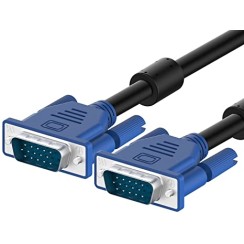
Although the VGA (Video Graphics Array) cable is an analog standard that has been surpassed in resolution and quality by digital connections like HDMI and DisplayPort, it remains surprisingly useful and relevant in many scenarios. Its main strength lies in its broad compatibility with older equipment and its simplicity. It's the perfect solution for:
- Connecting older desktop or laptop computers: Many PCs and laptops from a few years ago only have a VGA output. This cable is the only way to connect them to a VGA monitor or projector without adapters.
- Use with projectors: Many projectors installed in meeting rooms, educational centers, and offices still use the VGA connector as their primary video input. A VGA projector cable is often the quickest and most reliable way to connect a laptop for a presentation.
- Secondary monitor setups: If you have an old monitor that you want to use as a second screen for office tasks (displaying email, tools, etc.), a VGA cable is an inexpensive way to give it a second life without taking up the more valuable HDMI or DisplayPort ports on your graphics card.
- Industrial and diagnostic environments: Due to its robustness and simplicity, the VGA connector is still used in many industrial systems, servers, and diagnostic equipment where high resolution is not a priority.
Although it's not the best choice for gaming or high-resolution design, the VGA cable remains a reliable and universal connector for countless devices .
This is one of the most common questions, and the answer is clear: you need an active converter, not a simple adapter . The reason is the fundamental difference between the signals: VGA is an analog video signal, while HDMI is a digital video and audio signal . They are not natively compatible, so a simple cable that only changes the connector shape won't work. You need a device that 'translates' the signal. A VGA to HDMI converter is a small box or cable containing an electronic chip (an ADC, or Analog-to-Digital Converter) that takes the analog signal from the VGA port, digitizes it, and outputs it as an HDMI signal . When buying this type of VGA to HDMI adapter , you should keep two important things in mind:
- Audio: Since VGA only carries video, the converter will need a separate audio source. Therefore, these devices usually include a 3.5mm audio input (jack) and a cable to connect to your computer's headphone output. The converter's chip integrates this audio into the final HDMI signal.
- Power supply: The conversion process consumes energy. Therefore, most of these converters also include a USB port that needs to be connected to a USB port on your PC or a wall charger to function.
It is crucial to understand that these converters are unidirectional: a VGA to HDMI converter will not work in reverse (from HDMI to VGA).
Yes, and much more noticeably than with digital cables. Being an analog signal, a VGA monitor cable is very susceptible to signal degradation (attenuation) and electromagnetic interference (noise) as its length increases. The symptoms of a long or poor-quality VGA cable are very obvious:
- Blurry or unclear image: This is the most common problem. The definition of text and image edges is lost.
- 'Ghosting': Shadows or trails appear from elements in the image, especially those with high contrast.
- Dull or altered colors: The signal of one of the primary colors (red, green or blue) arrives weaker, affecting the color balance.
- Lines or 'snow' in the image: These are the result of interference from other nearby electrical appliances.
To minimize these problems, when buying a VGA cable , especially if it's going to be a VGA extension cable , you should pay attention to:
- Good shielding: A quality cable will have several layers of shielding to protect the signal from external interference.
- Ferrite cores: These are the plastic cylinders located near the ends of the cable. They contain a material that filters high-frequency electromagnetic noise.
- Cable thickness: A thicker cable (with a lower AWG number) usually has less resistance and suffers less signal degradation.
As a general rule, for 1080p resolutions, it is recommended not to exceed 5 meters with a good quality cable. For greater distances, cable quality becomes critical and a signal amplifier may be necessary.
Whether it works or not depends on which pin is affected, but bent pins are one of the most common causes of problems with VGA cables . The VGA connector (technically called DE-15) has 15 pins arranged in three rows, and each one has a specific function.
- Bent pins: This is a very common problem, especially if the male VGA cable is forced into the port. The good news is that, in most cases, they can be straightened very carefully . You can use very fine precision tweezers, the tip of an empty mechanical pencil, or a needle to gently realign the pin. It's crucial to do this slowly, because if the pin breaks, the cable will be unusable.
- A broken or missing pin: This depends on which pin is missing. The most important pins are those that carry the information for the three primary colors (Red, Green, Blue) and the horizontal and vertical synchronization pins.
- If one of the color pins is missing, you will see the image on the screen with a strange color cast (for example, if the red pin is missing, the image will look bluish/greenish).
- If one of the synchronization pins is missing, you will most likely not see any image , or it will appear distorted and flickering.
There is a pin (pin 9) that is often omitted by design on many cables, as it was used for a function that has fallen into disuse, so its absence is normal. However, if you notice color or image problems after connecting the cable, it is most likely that a pin is damaged and you need a new VGA monitor cable .
Related
Reviews from our users
Top sellers VGA