
 Back-to-School Offers
 Laptops
 Desktop computers
 Computer bundles
 Ordenadores All-in-One
 Monitors
 Refurbished mobile phones
 Tablets
 Zone Apple
 Peripherals and Accessories
 Networks and Cables











Grid
Welcome to our Networking category, where you'll find top-quality refurbished technology. We offer products like routers and switches, carefully inspected and guaranteed for excellent performance. Enjoy a reliable connection and save money without compromising on quality . Discover our selection and upgrade your network affordably!



Frequently asked questions
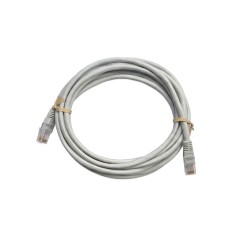
The RJ45 connector is the clear, 8-pin plastic connector found at the ends of virtually all network or Ethernet cables . It's the universal standard for connecting computers, routers, switches, and other network devices. The way the eight colored wires inside the connector are arranged determines whether a cable is 'straight-through' or 'crossover'.
- Straight-Through Cable: This is the type of cable you'll use in 99.9% of situations . In a straight-through cable, the order of the colored wires is the same at both ends of the RJ45 connector. It's used to connect an end device (such as a computer, network printer, or game console) to a network device (such as a router or switch).
- Crossover Cable: In this type of cable, some of the internal wires are 'crossed,' so that the transmit pin at one end connects to the receive pin at the other. Previously, a crossover cable was necessary to connect two devices of the same type directly to each other (for example, PC to PC, or switch to switch) without a router in between.
The good news is that crossover cables are practically obsolete these days. Almost all modern network devices incorporate a technology called Auto MDI-X , which automatically detects the type of cable connected and adjusts its pins internally. Therefore, you can use a standard straight-through cable for almost any connection, greatly simplifying your PC's cabling .
Although all Ethernet cables may look the same on the outside, their category determines the maximum speed they can support and their resistance to interference , which is crucial for your network's performance.
- Cat 5e cable: This is the oldest standard, but still very functional. It's designed to support speeds of up to 1 Gigabit per second (1 Gbps) , which is the speed offered by most home fiber optic connections. For most homes and standard office use, a Cat 5e cable is sufficient to avoid bottlenecks with your internet connection.
- Cat 6 cable (Category 6): This represents a significant leap forward. It features a tighter twist of the internal wires and often includes a plastic separator (spline) that reduces crosstalk or interference between pairs. This allows it to support speeds of up to 10 Gigabits per second (10 Gbps) over distances of up to 55 meters. It is the recommended and future-proof option . Even if your internet connection doesn't reach 10 Gbps, a Cat 6 cable will ensure maximum speed when transferring large files between computers within your local network (for example, to a NAS server).
- Cat 7 (Category 7) cable: This type of network patch cable takes protection a step further. Each twisted pair of wires is individually shielded, and the entire cable also has overall shielding. This shielding makes it extremely resistant to electromagnetic interference. It supports 10 Gbps at distances of up to 100 meters. However, for a typical home or office environment, this is excessive and won't provide a tangible performance improvement over a good Cat 6a cable, which is more flexible and economical.
When buying a network cable , opting for a Cat 6 or Cat 6a is the smartest decision for most users.
These initials refer to the type of shielding or shielding that the Ethernet cable has, which determines its resistance to electromagnetic interference (EMI).
- UTP (Unshielded Twisted Pair): This is the most common, economical, and flexible type of RJ45 cable . As its name suggests, the twisted pairs of wires inside have no additional metallic shielding. The twisting of the wires themselves helps to cancel most interference. For most home and office environments, a UTP cable is perfectly adequate and works without problems.
- FTP (Foiled Twisted Pair): This type of cable is similar to UTP, but adds an aluminum foil shield that wraps around the four twisted pairs of wires . This shield provides additional protection against external interference, making it a better choice for environments with a moderate level of electromagnetic noise.
- SFTP or S/FTP (Shielded and Foiled Twisted Pair): This is the version with the highest level of shielding. In an S/FTP cable, each individual twisted pair is wrapped in its own aluminum foil , and the entire assembly is further encased in a protective mesh. This double shielding makes it extremely resistant to interference . It is the type of cable that should be used in industrial environments, near heavy machinery, electric motors, or high-voltage wiring, where interference is very high. For home use, it is unnecessary.
While the convenience of Wi-Fi is undeniable, a wired network connection remains vastly superior in three key aspects: speed, latency, and stability . You should always opt for a wired connection for your desktop and high-performance devices.
- Sustained Speed: While modern Wi-Fi can reach very high speeds, these are theoretical and are affected by distance from the router, walls, and interference from other networks. An Ethernet cable provides a constant, uninterrupted connection at the maximum speed your internet connection or local network can offer (for example, 1 Gbps). This is crucial for downloading large files, streaming 4K without buffering, or transferring data to a NAS.
- Ultra-Low Latency (Ping): Latency is the time it takes for a data packet to travel to and from the network. For online gaming , low latency is absolutely critical. A wired connection offers a much lower and, above all, more stable ping than Wi-Fi, resulting in a smoother, lag-free gaming experience.
- Stability and Reliability: A wired connection is immune to the interference that affects Wi-Fi (such as neighbors' networks, microwaves, etc.). This results in a 100% stable connection, without micro-cuts or speed drops , which is essential for important work video calls, live streaming, or any task where an uninterrupted connection is crucial.
Use Wi-Fi for your mobile devices, but for your desktop PC, your console or your Smart TV, the internet cable is still king.
Related
Reviews from our users
Top sellers Grid