 Back-to-School Offers
 Laptops
 Desktop computers
 Computer bundles
 Ordenadores All-in-One
 Monitors
 Refurbished mobile phones
 Tablets
 Zone Apple
 Peripherals and Accessories
 Networks and Cables











- New
-67%
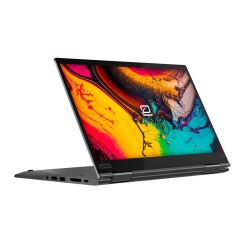
Discover refurbished Lenovo Yoga laptops: 2-in-1 convertible laptops that combine flexibility, performance, and style. Perfect for studying, working, or creating from anywhere. With a warranty included and reduced prices, access a premium experience without overpaying. Lenovo Yoga laptops like new, ready for you .

Frequently asked questions
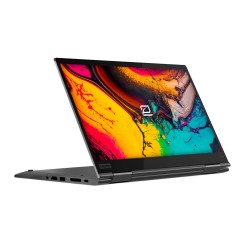
The magic of a Lenovo Yoga laptop lies in its 360-degree hinge, which allows it to take on different shapes to adapt to your needs at any given moment. It's not just a gimmick; it's a very real productivity tool. The four main modes are:
This transformative capacity is what makes Yoga the ultimate tool for versatility.
Yes, and it's one of the biggest concerns for users, but also one of the areas where Lenovo has invested the most engineering effort. The hinge on a Lenovo Yoga laptop isn't a fragile addition, but rather the core component of its design . In mid-range and high-end models, which are the ones typically found in the refurbished market, these hinges are made of metal alloys and subjected to extremely rigorous stress tests by the manufacturer. They are tested to withstand tens of thousands of opening, closing, and rotating cycles without losing their firmness or smoothness. This ensures that the screen will remain stable in any mode you choose, without wobbling or play. The feeling of solidity when switching between modes is one of the hallmarks of the Yoga range. By opting for a refurbished Lenovo Yoga , you benefit from this highly durable engineering, designed to withstand intensive use, at a much more accessible price. You can have complete confidence that the hinge is built to last and will be the cornerstone of your equipment's versatility for years to come.
For students and creatives, stylus compatibility on a refurbished Lenovo Yoga isn't just a bonus; it's a tool that completely transforms the device , merging the best of the analog and digital worlds. While your finger is ideal for navigation, the stylus offers precision that opens up a world of possibilities.
Getting a cheap Lenovo Yoga is a great idea, but to ensure a smooth and satisfying experience, there are three features that are essential these days. Even on the most affordable models, you shouldn't sacrifice these three pillars:
When you buy a refurbished Lenovo Yoga , you have the advantage of being able to access models that meet these three characteristics at a much more affordable price than a new one.
Related
Reviews from our users
Top sellers Lenovo Yoga
Top Rated Products