
 Back-to-School Offers
 Laptops
 Desktop computers
 Computer bundles
 Ordenadores All-in-One
 Monitors
 Refurbished mobile phones
 Tablets
 Zone Apple
 Peripherals and Accessories
 Networks and Cables













If you frequently use computers or any electronic device, you're surely more than familiar with USB connectors. These small ports have become the universal standard for connecting peripherals like keyboards, mice, hard drives, cameras, and mobile phones to a computer or other device. In this article, we'll explore the different types of USB connectors available, their features, and the most common uses for each, so you'll never have any doubts again.
What exactly are USB connectors?
USB connectors are a standard interface used to connect and communicate devices with a computer, whether it's a new computer, a refurbished computer, or a refurbished laptop. The acronym USB stands for "Universal Serial Bus," and it refers to a communication standard that allows data and power to be transferred between electronic devices. Most modern computers, both desktops and laptops, include several of these ports to connect all your devices.
Types of USB connectors and their characteristics
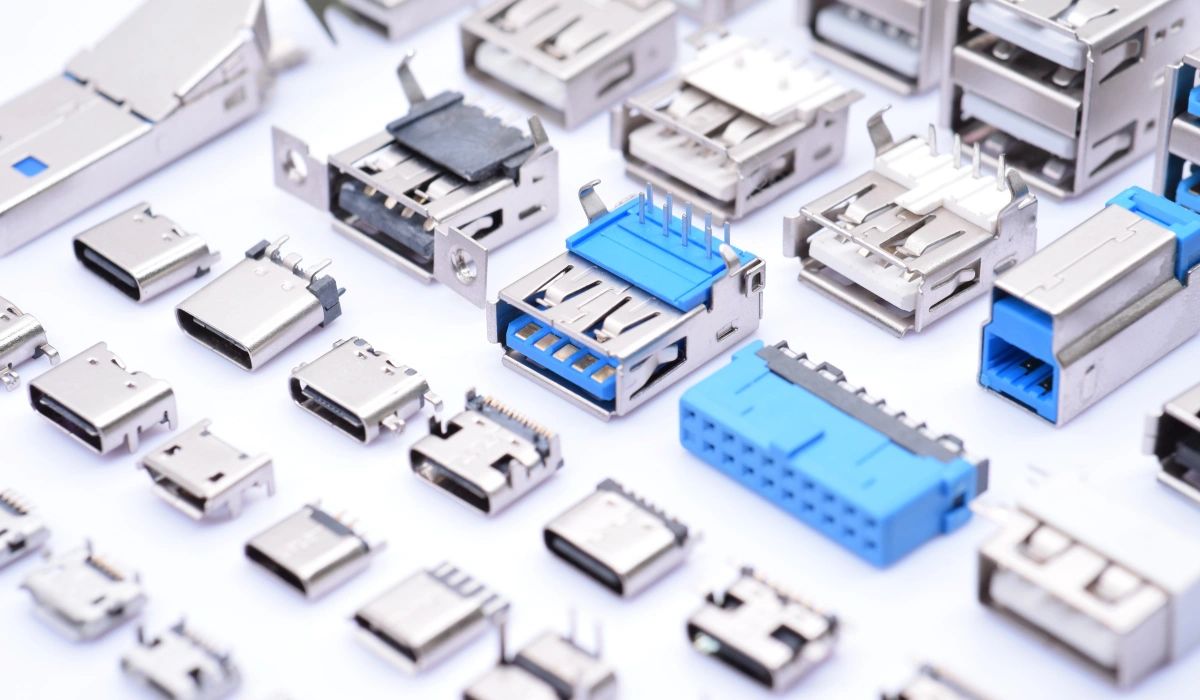
Although they all serve a similar function, not all USB connectors are created equal. Over the years, they have evolved to adapt to new devices and speeds. There are several types of USB connectors, each with a specific shape, size, and use. Below, we present a complete guide to the most common ones, ordered from oldest to newest.
USB Type-A: The classic connector
The USB Type-A connector is undoubtedly the most recognizable and widespread. It's the rectangular port you'll find on most computers, wall chargers, televisions, and game consoles. Its robust and universal design has kept it as the standard on the "host" side (the main device, like a PC) for decades.
- Shape: Rectangular and flat.
- Main use: To connect peripheral devices to a computer, such as keyboards, mice, USB flash drives, and external hard drives.
- Current status: It is still very common, although it is being progressively replaced by USB-C in newer devices.
USB Type-B: the connector for large peripherals
The USB Type-B connector is less common in everyday use. It has an almost square shape with beveled top edges. This design was intended for larger peripheral devices that don't need to be constantly plugged in and unplugged.
- Shape: Square with a beveled top edge.
- Main use: Connecting printers, scanners, and some older external hard drives to a computer.
- Current status: Virtually obsolete, it has been replaced by more modern and smaller connectors.
Mini USB: the first step towards miniaturization
The Mini USB was one of the first attempts to reduce the size of USB port types to fit smaller devices. For years it was the standard in digital cameras, MP3 players, and early smartphones.
- Shape: Small and trapezoidal.
- Main use: Digital cameras, GPS devices, some older portable hard drives, and console controllers such as the PS3.
- Current status: Obsolete, it has been completely replaced by Micro USB and USB-C.
Micro USB: the king of smartphones for a decade
Micro USB was a significant improvement over Mini USB, being smaller, flatter, and more durable. It quickly became the standard for charging and data transfer for the vast majority of Android smartphones, tablets, and other portable devices for almost a decade.
- Shape: Small, flat, and trapezoidal, slightly wider than Mini USB.
- Main use: Charging and transferring data on mobile phones (such as our refurbished smartphones), older Android tablets, Bluetooth speakers, external batteries, and many other electronic accessories.
- Current status: Although still present in many low-end or older devices, it is being replaced at a rapid pace by USB-C.
You might be interested in: Types of computer processors!
USB Type-C: the connector of the present and future
USB Type-C is the most modern and versatile of all existing USB connector types. Its main advantage is its reversible design, meaning it will work no matter which way you plug it in. Furthermore, it can transmit high-speed data, video, and power over a single cable, making it the ultimate standard.
- Shape: Oval, small, and symmetrical.
- Main use: Found on almost all modern devices, from smartphones and tablets to the latest-generation laptops. It's used for charging, data transfer, connecting monitors, and much more. If your laptop has few ports, docking stations that expand your port selection often use this connection.
- Current status: It is the current standard and is expected to replace all other types of USB connectors in the future.
Summary table of USB connector types
| Connector | Shape | Main use | Current status |
|---|---|---|---|
| USB Type A | Rectangular and flat | Keyboards, mice, flash drives, external drives | Very common |
| USB Type B | Square and bevelled | Printers and scanners | Phased out |
| Mini USB | Small and trapezoidal | Old cameras and MP3 players | Obsolete |
| Micro USB | Small and flat | Old Android phones and tablets | Being phased out |
| USB Type C | Oval and reversible | Modern devices: charging, data and video | Current standard |
An important clarification: connectors vs. versions (USB 2.0, 3.0, 4.0)
It is crucial not to confuse USB connector types (the physical shape of the plug, such as Type A or Type C) with the USB standard version (the transfer speed, such as USB 2.0, 3.0, 3.1, or 4.0).
For example, a USB Type-A connector can be 2.0 (slower, usually with a black plastic interior) or 3.0 (faster, with a blue plastic interior). Similarly, a cable with a USB Type-C connector can operate at USB 2.0 speeds or the blazing-fast speeds of USB 4.0.
- USB 2.0: Offers speeds up to 480 Mbps. Sufficient for keyboards, mice, or printers.
- USB 3.0 / 3.1 / 3.2: Also known as "SuperSpeed," it offers speeds from 5 Gbps to 20 Gbps. It is ideal for transferring large files to external hard drives and other storage devices.
- USB 4.0: The latest, reaching speeds of up to 40 Gbps and compatible with Thunderbolt, allowing you to connect multiple high-performance devices.
Conclusion: a connector for every need
USB connectors are an essential and ubiquitous part of our electronic devices. Knowing which type of USB connector a particular device needs is crucial for connecting everything correctly and ensuring it functions properly. In this article, we've covered the most common types of USB cables and ports, from the classic Type-A to the modern and versatile Type-C.
We hope this guide has helped you understand the differences between each type and their specific uses. If you need a cable for any of your devices, feel free to purchase high-quality USB cables from our store.


