 Laptops
 Desktop computers
 Ordenadores All-in-One
 Computer bundles
 Monitors
 Refurbished mobile phones
 Tablets
 Zone Apple
 Peripherals and Accessories
 Networks and Cables












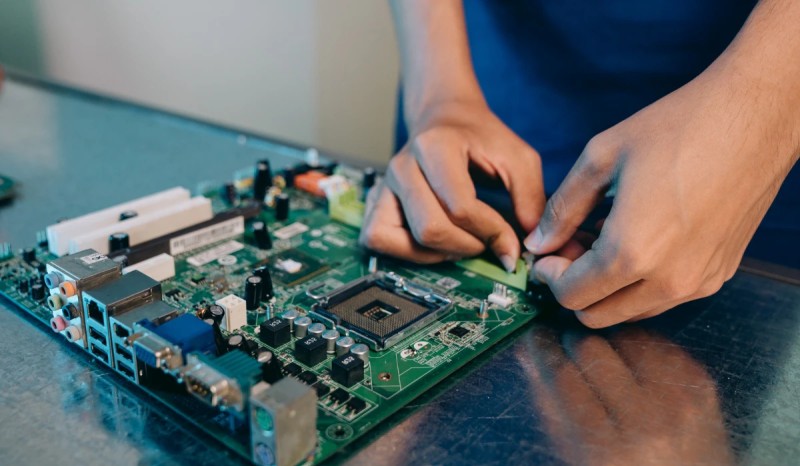
The motherboard, also known as the mainboard or system board, is the true backbone of any computer. It's the large printed circuit board that connects and interconnects all the other components: the processor, RAM, graphics card, and storage. But when looking for one, you'll encounter a fundamental question: what type of motherboard do I need?
The answer depends primarily on its form factor, meaning its size and design. In this guide, we'll break down all the motherboard models available, from the largest and most expandable to the most compact, so you can make an informed decision and build the perfect PC for your needs.
Why are there different types of motherboards?
The main reason is very simple: not all computers are the same, nor are they built for the same purpose. Choosing a motherboard model directly determines three key aspects of your future PC:
- Case size (chassis): A large motherboard needs a large tower.
- Expansion capacity: How many additional components (graphics cards, hard drives, etc.) you can install.
- Connectivity: The number of USB ports, fan connectors, and other available connections.
The different form factors standardize dimensions, screw hole locations, and the overall port layout. This ensures that an ATX motherboard, for example, will fit in any ATX case, regardless of the manufacturer. If you're thinking of buying a desktop computer, it's important to be aware of all this.
The main types of motherboards by form factor
Although many formats exist, four completely dominate the consumer market. Understanding them is essential to choosing the right type of motherboard.
ATX: the gold standard for desktop computers
The ATX (Advanced Technology eXtended) form factor has been the most versatile and popular standard for desktop computers for decades. It offers a fantastic balance between size and functionality, providing enough expansion slots and connectors for the vast majority of users, from office PCs to powerful, high-performance gaming rigs. If you're unsure and space isn't an issue, an ATX motherboard is almost always a safe bet.
Micro-ATX (MATX): The perfect balance between size and price
Micro-ATX is a slightly shorter and more square version of ATX. Its popularity has grown enormously because it offers an ideal balance between a more compact size and a good number of features. They usually have fewer PCIe expansion slots, but more than enough for most users (one for the graphics card and a few more for other devices). They are perfect, used in many of our budget PCs, are medium-sized, and are usually cheaper than their larger ATX counterparts, making them the preferred choice for builds on a tight budget.
Mini-ITX: Maximum compactness
If your goal is to build the smallest possible PC, the Mini-ITX form factor is your only option. These motherboards are tiny, designed for ultra-compact cases (SFF - Small Form Factor). They are ideal for home theater PCs (HTPCs or Media Center PCs), portable systems for LAN parties, or minimalist workstations that take up minimal desk space. Their main limitation is space: they typically only have one expansion slot (for the graphics card) and two RAM slots.
E-ATX (Extended ATX): for enthusiasts and professionals
The E-ATX is the larger sibling in the family. This type of motherboard is designed for the most demanding users, such as creative professionals, overclocking enthusiasts, and hardcore gamers. It offers the maximum number of RAM slots, more PCIe slots for multi-GPU configurations (SLI/CrossFire), and higher-quality components (VRMs) to support very high-power processors. Its large size requires special full-tower PC cases.
You might be interested in: Motherboard and processor compatibility!
Comparative table of motherboard types
| Form Factor | Typical Dimensions (mm) | Expansion Slots (PCIe) | Ideal Use |
|---|---|---|---|
| E-ATX | 305 x 277 | Up to 7 | Workstations, Servers, Extreme Gaming |
| ATX | 305 x 244 | Up to 7 | Desktop PCs, High-End Gaming PCs |
| Micro-ATX | 244 x 244 | Up to 4 | Office PCs, Mid-Range Gaming PCs, Budget PCs |
| Mini-ITX | 170 x 170 | 1 | Small Form Factor (SFF) PCs, HTPC (Media Center) |
Other less common motherboard models
Although the four above are the ones you'll find in 99% of stores, there are other formats designed for very specific needs:
- BTX (Balanced Technology Extended): An Intel-driven design that aimed to optimize airflow and cooling. It never gained popularity in the consumer market and is now obsolete.
- Pico-ITX and Nano-ITX: Even smaller versions than Mini-ITX, created by VIA Technologies for embedded systems, IoT (Internet of Things) devices, and industrial applications where space is at a premium.
- Server motherboards (SSI CEB, EEB, etc.): Standardized formats larger than E-ATX, designed for dual-processor servers and workstations, with support for massive amounts of RAM.
How to choose the right motherboard for you?
Choosing a motherboard model goes beyond size. Once you've decided on the form factor based on the size of PC you want, you should ask yourself these questions:
- Which processor am I going to use? This will determine the socket you need (e.g., AM5 for the new AMD Ryzen, LGA1700 for the latest Intel Core).
- How much RAM do I need? Most Mini-ITX motherboards only have 2 slots, while ATX and Micro-ATX motherboards usually have 4.
- How many hard drives or SSDs will I be installing? Check the number of SATA ports and M.2 slots.
- Do I need a lot of USB connections? Compare the number of ports on the back panel.
Answering these questions will help you filter motherboard models and find the perfect one for your build, ensuring you don't fall short on performance or overpay for features you won't use.